
Getting started with normative modelling#
Welcome to this tutorial notebook that will show you the very basics of normative modeling. It’s like the “Hello World” of normative modeling.
Let’s jump right in.
Imports#
import warnings
import pandas as pd
import matplotlib.pyplot as plt
from pcntoolkit import (
    BLR,
    NormativeModel,
    NormData,
    load_fcon1000,
    plot_centiles,
    plot_qq,
)
import pcntoolkit.util.output
import seaborn as sns

sns.set_style("darkgrid")
warnings.simplefilter(action="ignore", category=FutureWarning)
pd.options.mode.chained_assignment = None  # default='warn'
pcntoolkit.util.output.Output.set_show_messages(False)
Load data#
First we download a small example dataset from github.
# Download an example dataset
norm_data: NormData = load_fcon1000()
# Select only these three features to model for this example
norm_data = norm_data.sel({"response_vars": ["WM-hypointensities", "Left-Lateral-Ventricle", "Brain-Stem"]})
# Train-test split
train, test = norm_data.train_test_split()
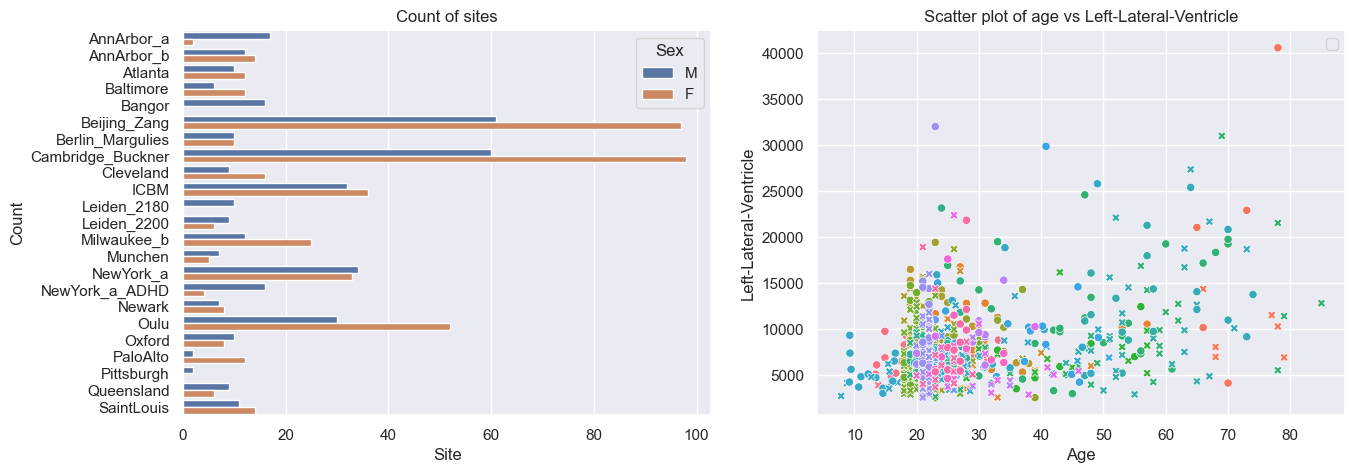
# Inspect the data
df = train.to_dataframe()
fig, ax = plt.subplots(1, 2, figsize=(15, 5))

sns.countplot(data=df, y=("batch_effects", "site"), hue=("batch_effects", "sex"), ax=ax[0], orient="h")
ax[0].legend(title="Sex")
ax[0].set_title("Count of sites")
ax[0].set_xlabel("Site")
ax[0].set_ylabel("Count")

scatter_feature = "Left-Lateral-Ventricle"

sns.scatterplot(
    data=df,
    x=("X", "age"),
    y=("Y", scatter_feature),
    hue=("batch_effects", "site"),
    style=("batch_effects", "sex"),
    ax=ax[1],
)
ax[1].legend([], [])
ax[1].set_title(f"Scatter plot of age vs {scatter_feature}")
ax[1].set_xlabel("Age")
ax[1].set_ylabel(scatter_feature)

plt.show()
Creating a Normative model#
save_dir = "/Users/stijndeboer/Projects/PCN/PCNtoolkit/examples/saves"
model = NormativeModel(BLR(), inscaler="standardize", outscaler="standardize")
model.has_batch_effect
False
Fit the model#
With all that configured, we can fit the model.
The fit_predict function will fit the model, evaluate it, save the
results and plots, and return the test data with all the predictions
added.
After that, it will compute Z-scores and centiles for the test set.
All results can be found in the save directory.
model.fit_predict(train, test)
<xarray.NormData> Size: 87kB
Dimensions:            (observations: 216, response_vars: 3, covariates: 1,
                        batch_effect_dims: 2, centile: 5, statistic: 11)
Coordinates:
  * observations       (observations) int64 2kB 756 769 692 616 ... 751 470 1043
  * response_vars      (response_vars) <U22 264B 'WM-hypointensities' ... 'Br...
  * covariates         (covariates) <U3 12B 'age'
  * batch_effect_dims  (batch_effect_dims) <U4 32B 'sex' 'site'
  * centile            (centile) float64 40B 0.05 0.25 0.5 0.75 0.95
  * statistic          (statistic) <U8 352B 'EXPV' 'MACE' ... 'SMSE' 'ShapiroW'
Data variables:
    subject_ids        (observations) object 2kB 'Munchen_sub96752' ... 'Quee...
    Y                  (observations, response_vars) float64 5kB 2.721e+03 .....
    X                  (observations, covariates) float64 2kB 63.0 ... 23.0
    batch_effects      (observations, batch_effect_dims) <U17 29kB 'F' ... 'Q...
    Z                  (observations, response_vars) float64 5kB 0.8681 ... -...
    centiles           (centile, observations, response_vars) float64 26kB 75...
    logp               (observations, response_vars) float64 5kB -1.254 ... -...
    Yhat               (observations, response_vars) float64 5kB 2.041e+03 .....
    statistics         (response_vars, statistic) float64 264B 0.1501 ... 0.9891
    Y_harmonized       (observations, response_vars) float64 5kB 2.721e+03 .....
Attributes:
    real_ids:                       True
    is_scaled:                      False
    name:                           fcon1000_test
    unique_batch_effects:           {np.str_('sex'): [np.str_('F'), np.str_('...
    batch_effect_counts:            defaultdict(<function NormData.register_b...
    covariate_ranges:               {np.str_('age'): {'mean': np.float64(28.2...
batch_effect_covariate_ranges: {np.str_('sex'): {np.str_('F'): {np.str_(...Plotting the centiles#
With the fitted model, and some data, we can plot some centiles. There are a lot of different configurations possible, but here is a simple example.
plot_centiles(model, scatter_data=train)
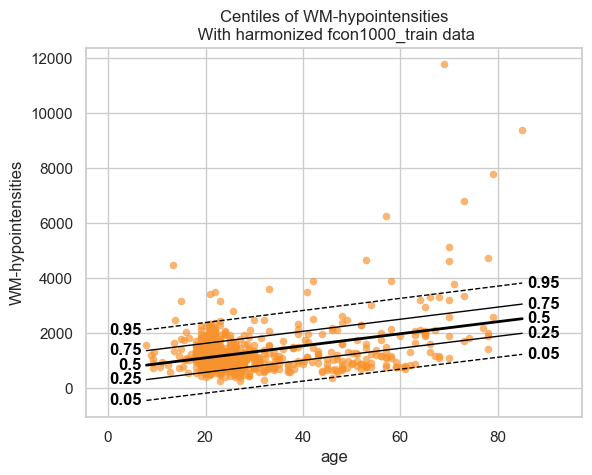
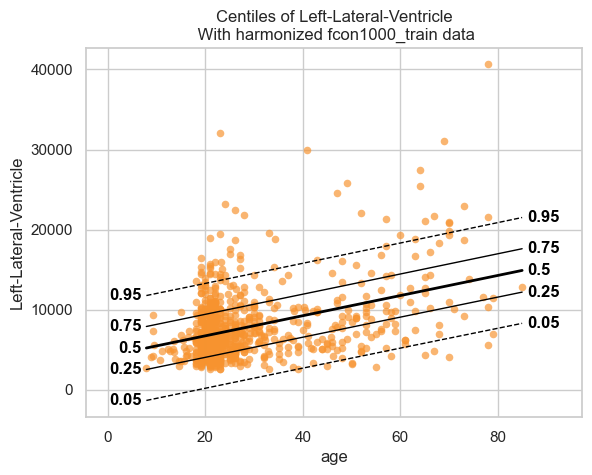
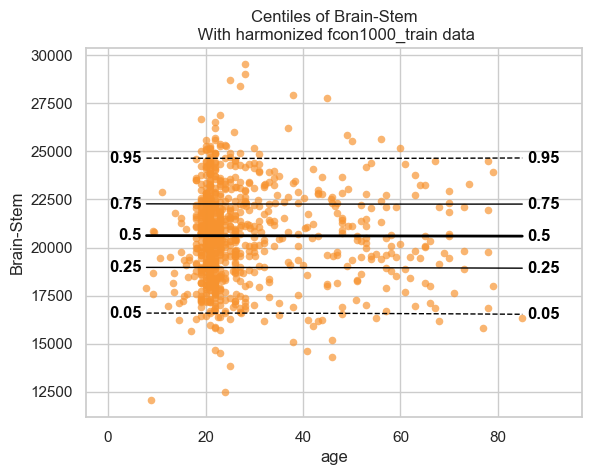
We see that the model fits the data reasonably well. We can do better, but that is a topic for another tutorial.
Showing the evaluation metrics#
We also computed evaluation metrics for the model. Those are saved in
the save_dir/results/statistics.csv file, but are also added to the
NormData object as a new data variable.
# We can use the `get_statistics_df` method to get a nicely formatted dataframe with the evaluation metrics.
display(train.get_statistics_df())
display(test.get_statistics_df())
| statistic | EXPV | MACE | MAPE | MSLL | NLL | R2 | RMSE | Rho | Rho_p | SMSE | ShapiroW |
|---|---|---|---|---|---|---|---|---|---|---|---|
| response_vars | |||||||||||
| Brain-Stem | 0.000004 | 0.006311 | 0.096330 | -7.800671 | 1.418910 | 0.000004 | 2442.168242 | -0.050426 | 1.390658e-01 | 0.999996 | 0.996466 |
| Left-Lateral-Ventricle | 0.162276 | 0.053828 | 0.401734 | -8.440148 | 1.330158 | 0.162276 | 3877.069187 | 0.269669 | 7.905570e-16 | 0.837724 | 0.877568 |
| WM-hypointensities | 0.132905 | 0.068724 | 0.410158 | -6.778665 | 1.345555 | 0.132905 | 760.501165 | 0.019769 | 5.621687e-01 | 0.867095 | 0.722254 |
| statistic | EXPV | MACE | MAPE | MSLL | NLL | R2 | RMSE | Rho | Rho_p | SMSE | ShapiroW |
|---|---|---|---|---|---|---|---|---|---|---|---|
| response_vars | |||||||||||
| Brain-Stem | -0.000274 | 0.014259 | 0.103240 | -7.790895 | 1.525974 | -0.000309 | 2692.120004 | -0.105739 | 0.121292 | 1.000309 | 0.989058 |
| Left-Lateral-Ventricle | 0.175440 | 0.046296 | 0.430686 | -8.443777 | 1.404512 | 0.171542 | 4168.272079 | 0.220610 | 0.001099 | 0.828458 | 0.898344 |
| WM-hypointensities | 0.150136 | 0.060741 | 0.444148 | -6.693763 | 1.130787 | 0.143994 | 559.964146 | -0.027495 | 0.687809 | 0.856006 | 0.972405 |
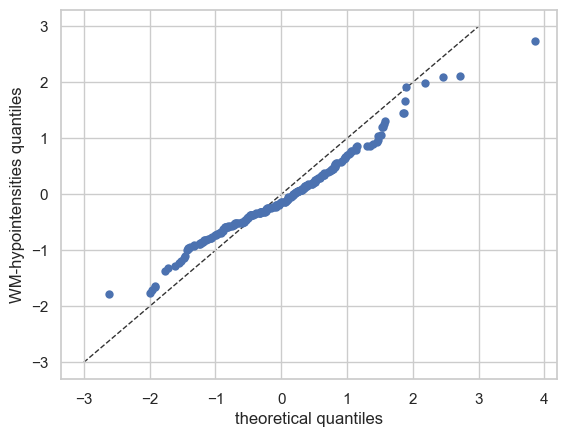
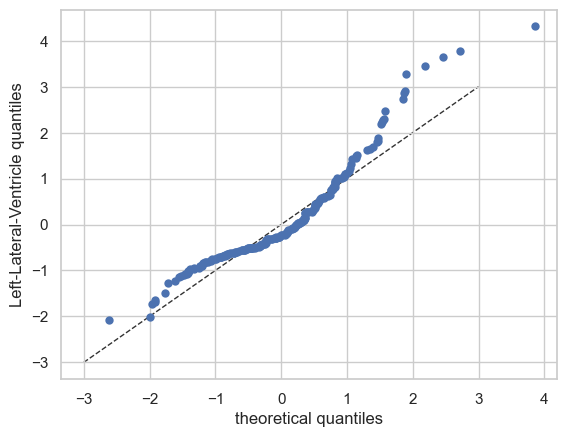
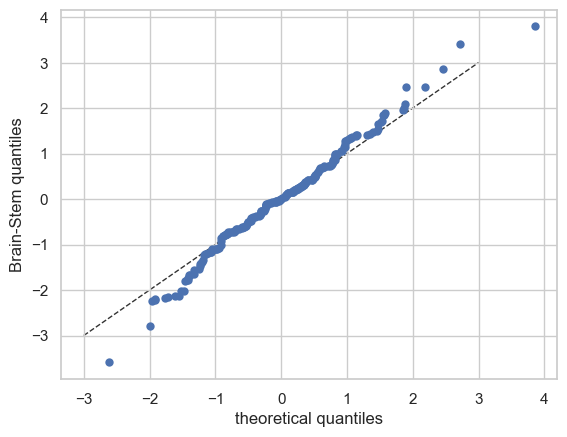
QQ plots#
We also have a nice function to make QQ plots.
plot_qq(test, plot_id_line=True)
And those are the basics of Normative Modelling with the PCNtoolkit. We will go over some more advanced models in the next tutorials, but this should give you a good first impression.